

2023-05-19
New Features
- Added the ability to rename a file after you upload it. (How to upload a BAPLIE file)
-
You need View/Edit or admin access to rename a file. Guest users and users with read only access cannot rename a file.
-
At the time of this release, you clicked a pencil icon in the file list. Today you do this: on the Upload BAPLIE page, click the three dots in the Actions column of the file (1 in the picture). Then click Edit File Name (2 in the picture).

-
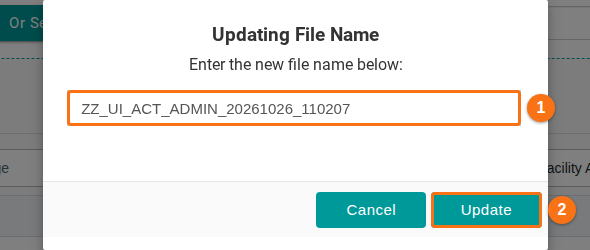
The Updating File Name window opens. Type the new name in the box (1 in the picture) and click Update (2 in the picture). Click Cancel to stop.
-
Bug Fixes
-
Fixed an issue where the option to delete an uploaded file was not shown in some cases. The option is shown if:
- You are an administrator of the facility, OR
- You uploaded the file and you have View/Edit permission.
At the time, this was a red X icon. Today it is Delete File in the same three-dot menu (see the first picture above).
-
Changed several functions, including the dashboard, the 2D Bay View and the 3D View, so that they load about 70% faster than before. Our developers looked for ways to make the code faster in several areas.