

2023-05-15
New Features
-
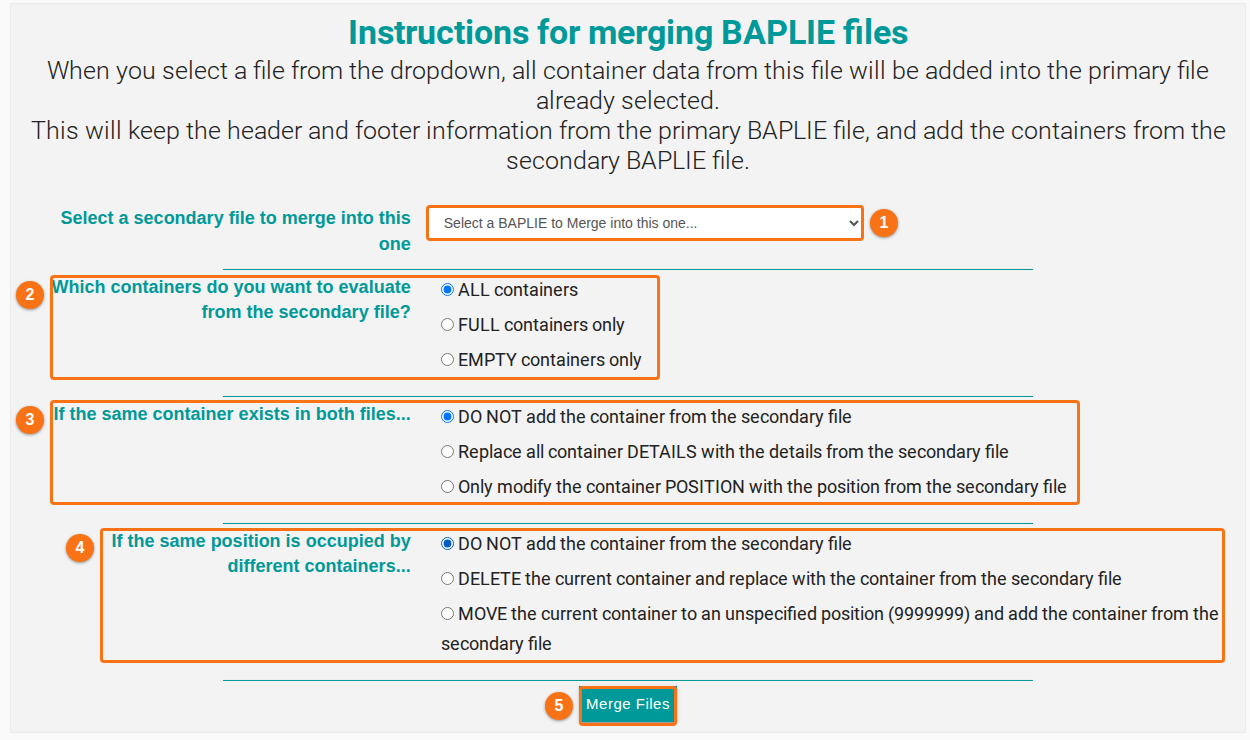
Revamped the Merge Files function. You now have more control over what to merge. (How to navigate the Merge Files option)
- Select a secondary file to merge into this one (1 in the picture): the file whose containers you add to the open file.
- Which containers do you want to evaluate from the secondary file? (2 in the picture): choose ALL containers, FULL containers only or EMPTY containers only.
- If the same container exists in both files… (3 in the picture): choose what to do. You can keep the container as it is, replace its details, or change only its position.
- If the same position is occupied by different containers… (4 in the picture): choose what to do with the two containers.
- Click Merge Files (5 in the picture).
Bug Fixes
- POL Terminal and POD Terminal were filled only if the code list qualifier “TER” was also in the file. The SMDG BAPLIE specification says this qualifier is optional. We removed this condition. Now the POL Terminal and POD Terminal fields show their data more often, when the BAPLIE file has it.
- Fixed an issue where users with View/Edit permission could not delete a file that they uploaded and shared with the facility.
- Fixed an issue where M2PW was not accepted as a valid ISO code.
- Fixed an issue where Import From Excel did not use the full list of known ISO codes to check the code before the import.