

How to identify restows?
Use the 2D Bay View and color the containers by Port Of Discharge (POD). A container that sits above a container with the POD of your port is a restow. A restow is a container that is unloaded and loaded again, or shifted, to a different slot of the same vessel during the port call.
BAPLIE Viewer Online does not have the voyage rotation details (the order of the ports). So it cannot find the restows or make a restow report by itself. But you can find the restows with these steps.
- Upload your BAPLIE file. See How to upload a BAPLIE file.
- In the Function Menu, open Visualization and click 2D Bay View.
- In the Color & Filter panel on the right, open the Colour by list and choose Port of Discharge. The list under it shows each port with its color and its container count.
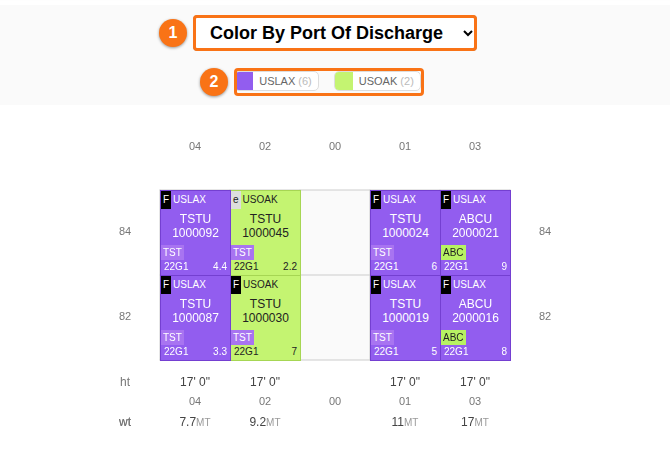
- Find the color of your port in the list. Look for containers that are stacked above containers of this color. Each one is a restow. The system must move it to reach the container below.
Example: your port is USOAK. A container with another POD, for example USLAX, sits above a USOAK container. This container is a restow. Count all such containers in all bays to get the number of restows.
What to do next
Section titled “What to do next”- If you have a list of restows from another tool, you can merge it into your pre-plan BAPLIE. See How to use Correct Restows to merge a restow list into a pre-plan BAPLIE. The mode Correct Restows reads the restows from your CSV file. It does not find them by itself.
- To record a restow by hand, use Re-Stow in the Move mode. See How to use the Move Containers feature in 2D Bay View.