

What is a Multi-Lift opportunity, and how does the report find them?
A multi-lift opportunity is a group of containers that a quay crane could lift in one move: a twin, a tandem, a triplet or a quad. The report pairs the containers of your file with simple rules and your crane limits. The result is an estimate. It does not use real crane data.
You need a membership that includes Multi-Lift and Admin or Edit permission. See Why can’t I use Edit, Multi-Lift, Move or 3D in the 2D view?
- Open your Inbound BAPLIE file in 2D Bay View. In the Mode list, choose Multi-Lift.
- In the window Calculation Parameters, choose the Terminal UN/LOC Code and the Container Types Eligible. Set the crane capabilities and limits.
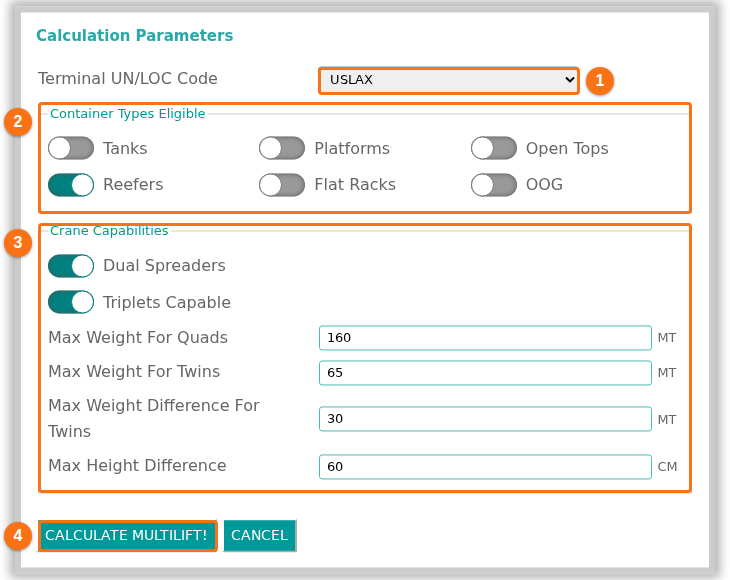
- Click CALCULATE MULTILIFT!. The report opens with the tabs Inbound, Outbound and Total Summary.
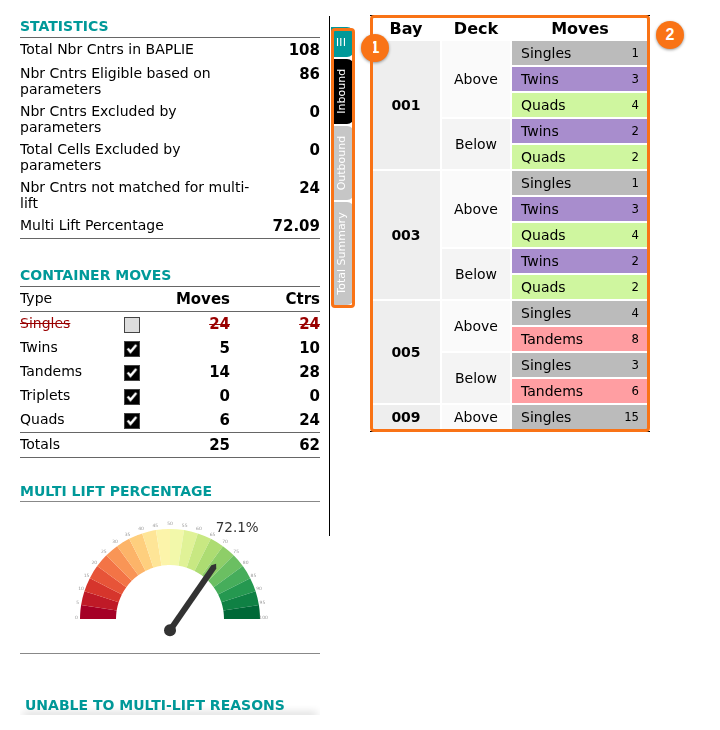
How the report finds them
Section titled “How the report finds them”- It counts a container only if its port of discharge or port of load is your terminal code. It leaves out containers whose type is not ticked.
- It pairs containers in the same bay group, on the same tier, in rows that are next to each other. It uses each container once.
- A Twin is two 20-foot containers in the same row, in bay N and bay N+2.
- A Tandem is two 40-foot containers in the same bay. It needs Dual Spreaders.
- A Triplet is one 40-foot and two 20-foot containers. It needs Dual Spreaders and Triplets Capable.
- A Quad is four 20-foot containers. It needs Dual Spreaders.
- A pair must stay inside your limits for total weight, weight difference and height difference. A container that cannot be paired is a Single.
UNABLE TO MULTI-LIFT REASONS in the report shows why containers could not be paired.
For the full rules, the Outbound file, the PDF and the colors in the 2D view, see How to: Use the Multi Lift Opportunities Report.