

2022-02-24
New Features
- When you register for a new account, you can now use a period in the user name, for example firstname.lastname.
- The Excel import now supports RFF segments. When you import an Excel file to create a BAPLIE, you can give the Bill of Lading or Booking numbers. See How to import optional fields from Excel.
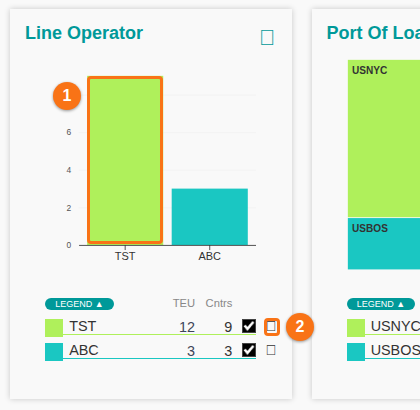
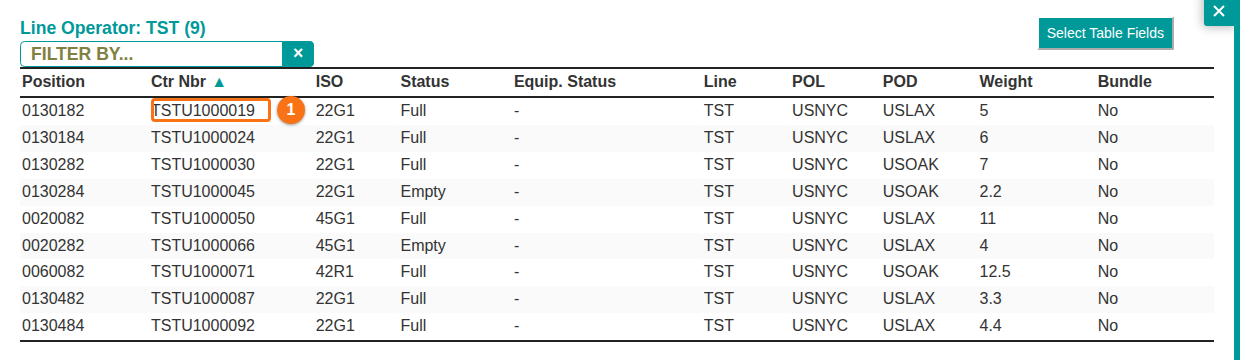
- The Dashboard now shows the containers behind each chart. To see them, click a chart item (1 in the picture), or click the small info icon at the right of a legend line (2 in the picture). Some browsers show this icon as an empty square. The list of the containers opens. In the list, you can click a row (1 in the second picture) to open the container information window. See How to see the containers behind a Dashboard chart and select table fields.
Bug Fixes
- Fixed a Dashboard problem. Containers with unknown positions (such as 999999) were not counted in the Dashboard results.
- Fixed a Dashboard problem. The TEU did not show if the free text record had a ~ character.
- Fixed an Excel import problem. If the header was not on row 1, the import used the first rows as containers. It now imports from the row after the header row.
- When you edit, delete or create container records, merge files or import from Excel, the UNT segment now shows the correct number of segments in the BAPLIE file.
- Fixed a timeout when you export a very large BAPLIE file (more than 10,000 container records) to Excel.
- Fixed the progress bar of Export to Excel. It did not move.
- Fixed the Clear Filter button in the Main Content. It did not work.
- Fixed the check of the position field in Import from Excel.
- Fixed an error when writing to the MOVINS file for operations in the 2D Bay View.
- Fixed the display of the BAPLIE data when you change the language while you view a BAPLIE file.
- The column filter of the IMDG column in the Main Content now does a “Contains” search. Before, it gave a list of values to choose from.
- Fixed an error when you download a BAPLIE file without NAD segments.