

Is BAPLIE Viewer Online available in Spanish, and how do I change the language of the 2D and 3D views?
Yes. The screens, the 2D and 3D views and this documentation are available in English and Spanish. You set the language one time in the user menu. The 2D and 3D views follow it.
Change the language
Section titled “Change the language”- On any page, click your user name at the bottom left of the screen (the avatar menu). A menu opens.
- Click Español to use Spanish, or English to go back to English.
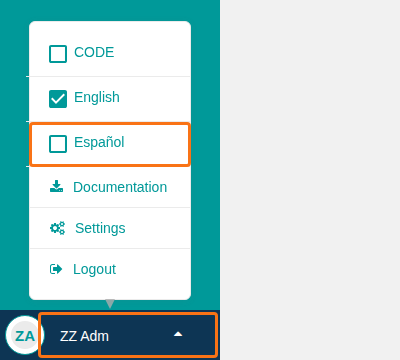
- Open 2D Bay View or 3D Vessel View from the Function Menu. The view opens in the language that you chose.
BAPLIE Viewer Online remembers your language the next time that you log in.
Why the 2D and 3D views have no language list
Section titled “Why the 2D and 3D views have no language list”When BAPLIE Viewer Online opens the 2D and 3D views, it sends your language to them. The views then hide their own language list and use your language.
The list shows only if you open the view with a direct link, because then no language is sent. It is a list with EN and ES in the top bar, to the right of the Search box. Choose a language. The page loads again in that language. Your file, bay and parameters stay. You cannot change the language in the middle of a Move action. Finish or cancel the action first.
Good to know
Section titled “Good to know”- The language of Excel exports is a separate facility setting. Only administrators can change it.
- Your browser may have its own translation feature. Some functions may not show correctly.
For more details, see How to use BAPLIE Viewer Online in other languages. To report a translation error, contact Support.