

Does BAPLIE Viewer Online support breakbulk?
Yes. BAPLIE Viewer Online supports break bulk.
Break bulk is cargo that is not in a container. For example, a yacht that is lifted onto the deck of a container ship without a platform container.
How break bulk is in a BAPLIE file
Section titled “How break bulk is in a BAPLIE file”- The BAPLIE specification has these equipment types: Container, Chassis, Break Bulk, Ro/Ro (roll on - roll off), Trailer and Generator.
- To mark an item as break bulk, use an EQD segment with the value BB. A container uses the value CN.
- A break bulk item has no container number. The BAPLIE specification says to use the UN/LOC code of the Port of Load and a 5-digit number. Do not change this number if the item is re-stowed on its trip.
- If the item uses more than one cell on the vessel, make an extra record for each extra cell, with its own position. Each extra record points to the leading position with an RFF (reference) segment.
This example is from the SMDG specification (section 5.1):

In the Main Content screen of BAPLIE Viewer Online, a break bulk item in three cells looks like this. The table is filtered on Type = Breakbulk. The three rows have the same Equipment Nbr. Each row has its own Position: bay 012, rows 00, 02 and 04, tier 06. The orange box marks the three rows.

Edit a break bulk record
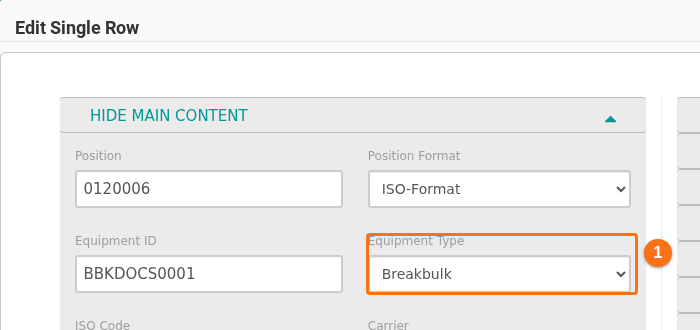
Section titled “Edit a break bulk record”To change a record, follow these steps. In the Edit Single Row window, the Equipment Type list shows Breakbulk for a break bulk record (1 in the picture). To make a record a break bulk item, choose Breakbulk in this list.
Reports
Section titled “Reports”You can find break bulk counts in the Bay summary, the Cargo summary and the Routing summary.
Note: BAPLIE Viewer Online cannot show break bulk in the 2D or 3D view. A break bulk item has no ISO code, so the system cannot know its size, type and height.