

Can I convert a BAPLIE file to another version?
Yes. All membership types can use BAPLIE Viewer Online as a BAPLIE file converter. You choose the version when you download the file.
Before you start: upload the BAPLIE file you want to convert, or open it from the View BAPLIE option in the Function Menu.
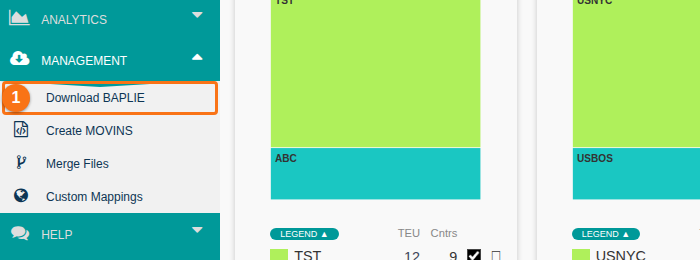
- In the Function Menu on the left, open Management and click Download BAPLIE (1 in the picture).
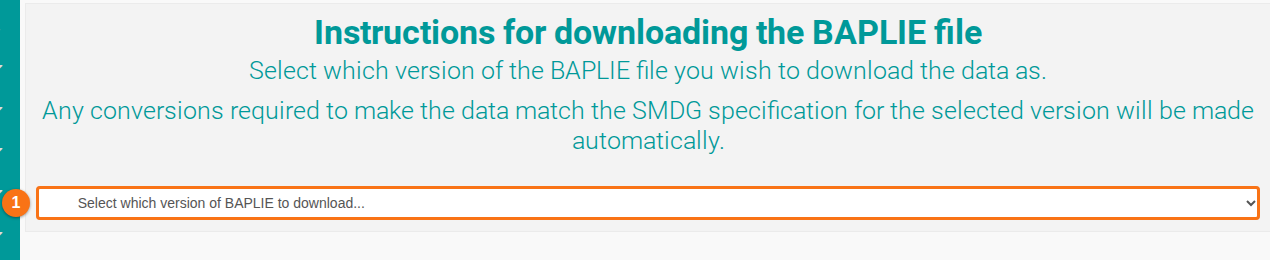
- The Download BAPLIE page opens. Open the list Select which version of BAPLIE to download… (1 in the picture) and choose a version. The table below explains each choice.
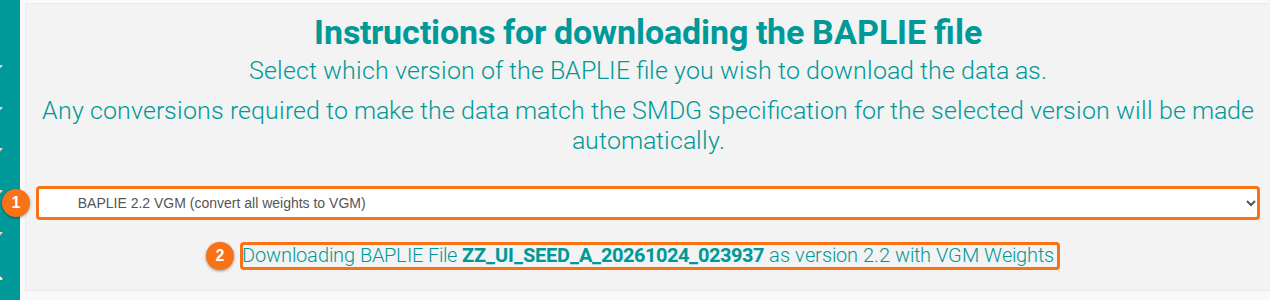
- The file downloads to your computer. The message under the list (2 in the picture) shows the file name and the version.
The choices in the list
Section titled “The choices in the list”| Choice | What the file has |
|---|---|
| Current Version | All details stay as they are in the file. The headers, LOC segments and MEA weight segments do not change. |
| BAPLIE 2.2 VGM (convert all weights to VGM) | BAPLIE 2.2 format. All MEA weight segments become VGM weights. |
| BAPLIE 2.2 Non-VGM (convert all weights to Non-VGM) | BAPLIE 2.2 format. All MEA weight segments become non-VGM weights (WT qualifier). |
| BAPLIE 2.0 (convert all weights to Non-VGM) | BAPLIE 2.0 format. All MEA weight segments become non-VGM weights (WT qualifier). |
| BAPLIE 1.5 (convert all weights to Non-VGM) | BAPLIE 1.5 format. All MEA weight segments become non-VGM weights. |
| Current Version without NAD segments | The name and address data (NAD segments) of the line operator is removed. Everything else stays. |
| Current Version without NAD segments from Full Containers | The NAD segments are removed from full containers only. Everything else stays. |
The list can have more choices. See How to choose a Download BAPLIE variant.
Note: a version change is more than a change of the Message Header (UNH) segment. Each BAPLIE version has its own specification. For example, the LOC segment codes of BAPLIE 1.5 do not exist in BAPLIE 2 and later, and the reverse. BAPLIE Viewer Online changes all segments to the SMDG specification of the version you choose.