

Can I upgrade my account to a different membership level?
Yes. You can change to a higher membership level when you need more features, users or guests.
Free Trial members: this page does not apply to you. After the 30 day trial, you must buy a membership to keep using BAPLIE Viewer Online. To buy a membership for the first time, click here.
- In the Function Menu, click Manage Facility under the name of your facility (1 in the picture). Then click Membership (2 in the picture).
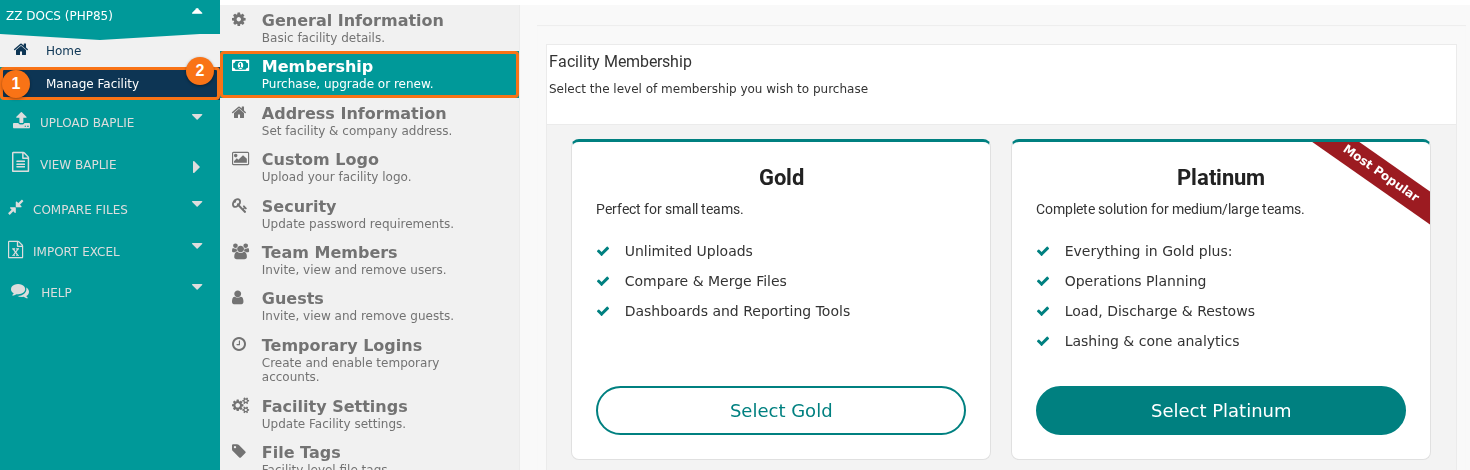
- Follow the same steps as for your first purchase. Click Select Gold or Select Platinum. Then choose a tier (the number of users and guests) and a duration (1 Month, 1 Year, 2 Years or 3 Years).
- On the payment page, a message shows below the payment buttons. It says: “You are about to change membership levels. When you do we shall manually refund you any difference in membership fees that are applicable to your upgrade/downgrade.” The message shows when your membership is paid and you choose a different level.

- Pay for the new membership. When we receive your payment, our team refunds the difference. You pay the full price of the new membership first. Then we refund the part of your old membership that you did not use.
Good to know
Section titled “Good to know”- Not sure if an upgrade is right for you? Open the Pricing Page. Use the Compare Plans section to see the main benefits and the cost of each level.
- You can also contact Support and choose the subject Membership Question. We help you choose the best membership. Ask us too if you want a quote for a custom Enterprise solution for your organization.