

2019-11
Bug Fixes
- Modified initial dashboard view to update tables behind charts when a legend item is clicked
- Fixed an issue that prevented the “Purchase Membership” button from working on the Upload BAPLIE page
- Fixed an issue with PDF files not generating in the 2D view when the file name contained special characters
- Fixed an issue preventing the expandable icon from showing on anomalies tab
New Features
- Enabled automatic PayPal Invoicing removing the need for a member of sales to manually generate requested invoices. Now they are automatically created with PayPal allowing you to pay by Credit Card instantly, or by bank transfer. Also added ability to download the invoice as PDF immediately upon creation. (Can I receive an invoice for my membership purchase?) (How to view payments, send an invoice copy and add a customer reference)
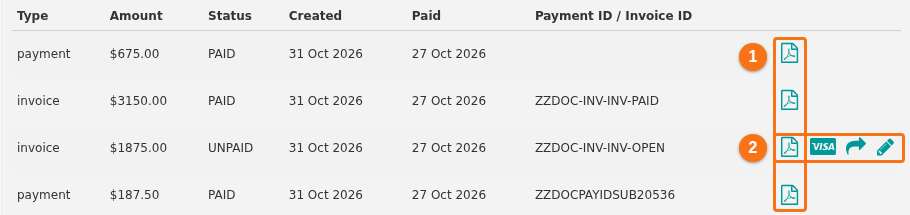
- Enabled automatic updating of membership accounts once PayPal invoice is paid. This removes the need for a member of sales to manually update an account as paid once notified by PayPal.
- Added ability to Print Bay Plan / sequence sheet from 2D View, once containers are selected to be moved (discharged, loaded or restowed). Once you have containers with a sequence number displayed, the Print PDF button is enabled allowing you to print the sequence sheet. (How to print a sequence bay plan from 2D View)
- Modified 3D View with new UI changes bringing it more inline with the 2D view. Filters have been enhanced to allow saving and filtering by multiple values. (How to navigate the 3D Vessel View) (How to filter containers shown in 3D Vessel View)
- Added a new Mini Quiz to logged in area to point people towards relevant how to guides.