

Does BAPLIE Viewer Online support multiple hazardous segments?
Yes. BAPLIE Viewer Online supports multiple hazardous (Dangerous Goods, DGS) segments.
The SMDG specification allows more than one DGS segment in a BAPLIE file. The maximum is 999 hazards for each container.
See the hazardous details
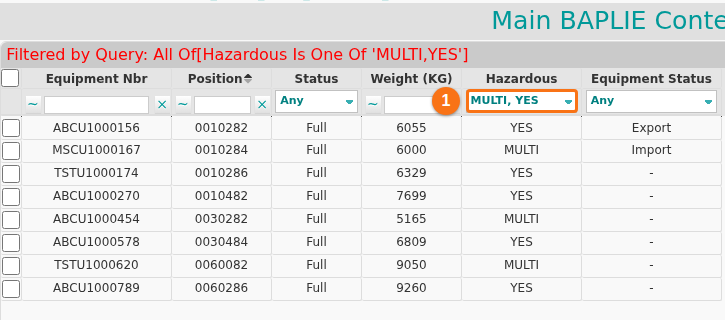
Section titled “See the hazardous details”- Main Content: the hazardous information shows in the Main Content screen. Use the filter or the advanced query to find containers with hazardous details. In the Hazardous column, YES means a hazardous container. MULTI means a container with more than one hazardous segment.
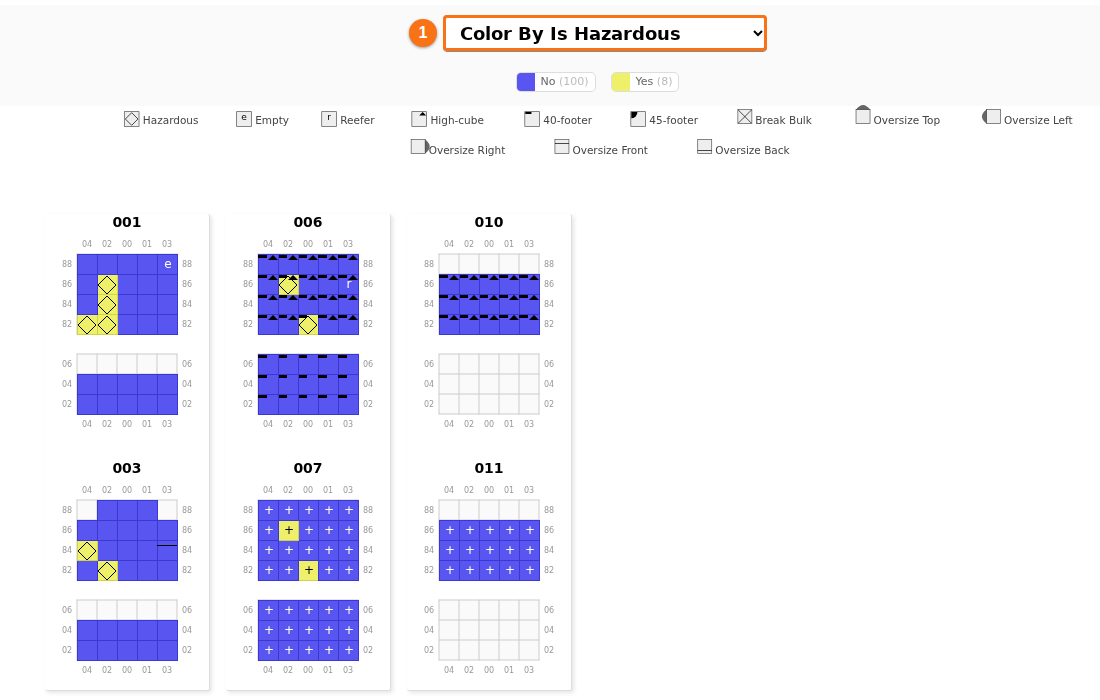
- 2D View: the 2D View also shows hazardous details. Click a container to see them in the information window. Or open the Colour by list in the Color & Filter panel and choose Is Hazardous. The list then shows the number of containers that are No and Yes. To see the IMDG class and the UN number on the containers, use Hazards View. A container with more than one hazard has a red + sign. See How to use Hazards View and print hazardous cargo in the 2D Bay View.
Add or import hazards
Section titled “Add or import hazards”- If a BAPLIE file needs more hazards on some containers, see the Edit Details page.
- If you import an Excel file to make a BAPLIE, see the Import from Excel page. It explains how to add more than one hazardous segment.